
Configure function triggers and outputs on CloudFerro Cloud
A working function can receive messages from another service, run on a schedule, or pass its result to the next stage of an application. Configure these connections on Triggers and output after preparing the function and any messaging resources it will use.
Prerequisites
No. 1 Portal access and an existing function
Open Functions in the organization and region that contain your function. Complete Create and deploy a function on CloudFerro Cloud first if you need a namespace and a function version.
No. 2 Messaging service and credentials (RabbitMQ or NATS integrations)
For RabbitMQ, follow Message Broker (Managed RabbitMQ) on CloudFerro Cloud to create a broker and a queue. Have the vhost, queue, exchange, and access credentials ready. For NATS, follow Message Streaming (Managed NATS) on CloudFerro Cloud to create an account and obtain credentials, then prepare the subject, stream, and consumer required by the integration.
A CRON trigger does not require a RabbitMQ or NATS service.
The messaging service and function must be in the same region. Region selection is separate for Functions, Message Broker, and Message Streaming; check both resources before adding the trigger. Check the dead-letter configuration if you use one.
Supported integrations
Integration |
Direction |
|---|---|
RabbitMQ |
Input trigger and output. |
NATS |
Input trigger and output. |
CRON |
Input trigger for a schedule. |
Another function |
Output to the next function. |
You can add, view, edit, and delete integrations. For RabbitMQ and NATS you can run Test configuration.
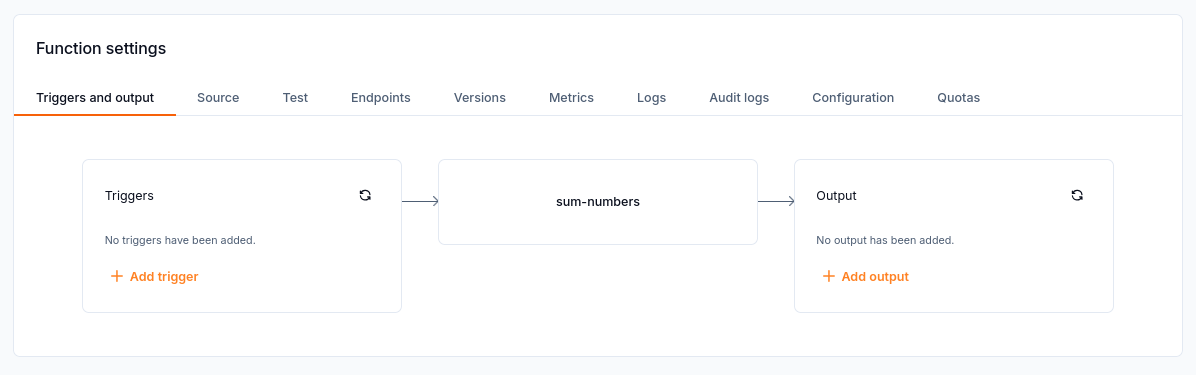
The sum-numbers function has no triggers or output configured yet.
Adding a trigger
Open Triggers and output on the function.
Select Add trigger and choose Message Broker, Message Streaming, or CRON.
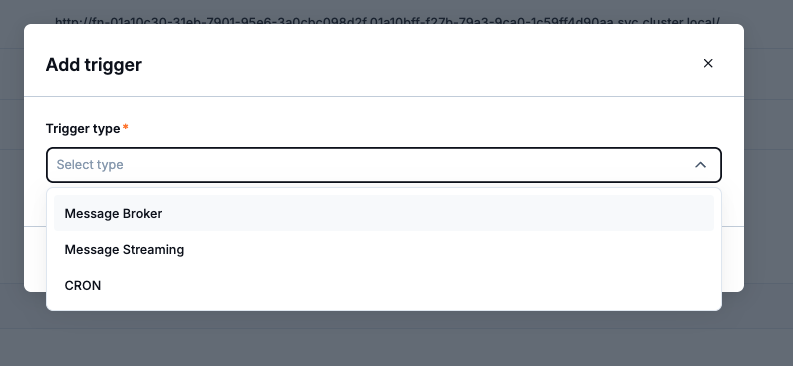
Trigger types: Message Broker, Message Streaming, and CRON.
For a RabbitMQ trigger, configure the broker, queue, virtual host, and credentials.
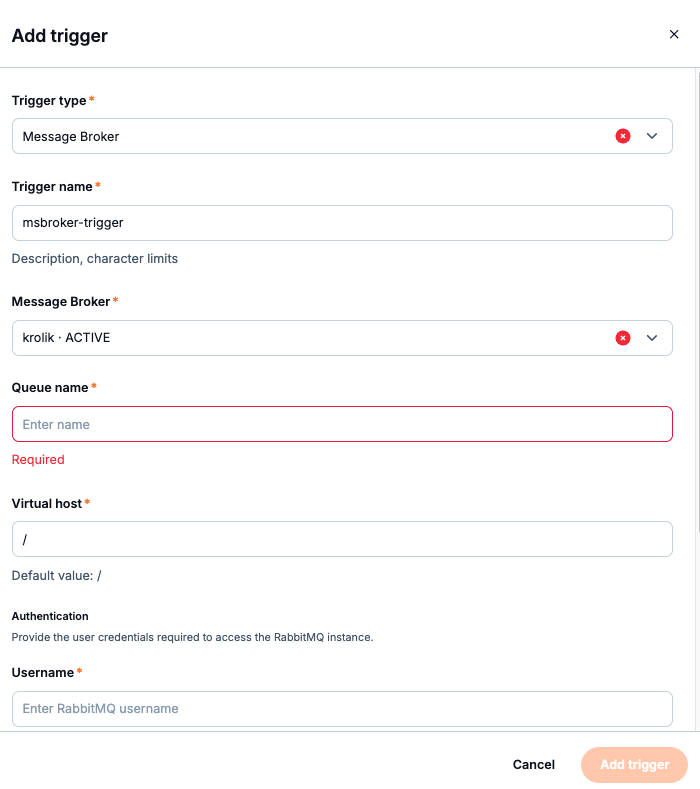
RabbitMQ trigger form with broker, queue, virtual host, and authentication fields.
Manage connections and outputs
The Triggers and output tab also lets you add an output to RabbitMQ, NATS, or another function. Existing integrations can be viewed, edited, and deleted.
For a RabbitMQ or NATS connection, run Test configuration after entering the connection settings. Check the selected region and credentials if the connection test fails. If the integration uses dead-letter handling, check that configuration as well.
What to do next
Use Test a function and manage its endpoints on CloudFerro Cloud to send a test event and inspect the response. Monitor and troubleshoot Functions on CloudFerro Cloud covers the logs, metrics, and audit information available during troubleshooting.