
Monitor and remove a NATS account on CloudFerro Cloud
When a dashboard is current but a report is late, the useful question is whether events are missing or waiting for that reader. The commands below inspect stored messages and consumer progress, then demonstrate a small backlog. My Portal supplies the account metrics, audit logs, and account deletion controls.
Prerequisites
No. 1 Portal access to the account
Sign in to My Portal and select the organization and region containing the account. Use an identity with permission for the account operation you intend to perform. Create your first NATS account on CloudFerro Cloud covers the route to the account.
No. 2 A client connection for stream-level checks
Set NATS_URL and NATS_CREDS using Connect with the NATS CLI on CloudFerro Cloud. The examples inspect JOB_STATUS, dashboard, and reporting from Work with streams and consumers on CloudFerro Cloud. Substitute your own names when inspecting another workload. Portal metrics and audit logs use your portal session.
Open the account details
On the NATS Accounts list, open the account row’s three-dot menu and choose See Details. The same menu contains Delete for removing the account.
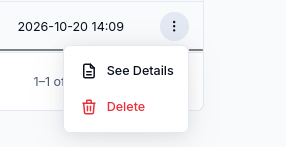
See Details opens the account page. Review the deletion guidance below before using Delete.
Review metrics and management actions
Open the account in My Portal to review its metrics, audit logs, and alerts about credential limits. Use metrics to follow account usage and audit logs to review management actions.
NATS has no logs tab in My Portal of the kind RabbitMQ has. Use the NATS CLI or an SDK to inspect streams and consumers, including their stored messages and reader progress.
Inspect storage and reader progress
Start with the account and stream:
nats --tlsfirst account info
nats --tlsfirst stream info JOB_STATUS
The account information shows JetStream usage and limits. In the stream information, compare Messages and Bytes with the configured maximums and Maximum Age. A low stored count may be expected when older events have reached retention.
Inspect each reader:
nats --tlsfirst consumer info JOB_STATUS dashboard
nats --tlsfirst consumer info JOB_STATUS reporting
Read these fields together:
Field |
What it tells you |
|---|---|
Unprocessed Messages |
Messages matching the consumer that have not yet been delivered to it. |
Outstanding Acks |
Delivered messages whose acknowledgments are still pending. |
Redelivered Messages |
Indicates message redelivery. Inspect processing failures and acknowledgment timing when this grows. |
Acknowledgment Floor |
The consumer and stream sequence position through which acknowledgments have advanced. |
These checks inspect state without fetching the application’s messages. Use them for an application-owned consumer before trying any command that would acknowledge its work.
Create and clear a small backlog
Use only the exercise consumers for this check. Begin with Unprocessed Messages: 0 and Outstanding Acks: 0 for both, having finished any earlier example events. Complete the check within the stream’s retention period.
Publish one event, then let only the dashboard read it:
nats --tlsfirst pub jobs.status \
  '{"job_id":"monitor-001","status":"finished"}' --jetstream

nats --tlsfirst consumer next JOB_STATUS dashboard \
  --count=1 --ack --raw

nats --tlsfirst consumer info JOB_STATUS reporting
With no other publishers or readers, reporting should show Unprocessed Messages: 1 and Outstanding Acks: 0. Its event is waiting to be delivered, while the dashboard has already read its copy.
Let reporting catch up:
nats --tlsfirst consumer next JOB_STATUS reporting \
  --count=1 --ack --raw

nats --tlsfirst consumer info JOB_STATUS reporting
The payload should identify monitor-001, and both counters should return to 0. If outstanding acknowledgments remain in a real application, inspect the reader’s processing and acknowledgment behavior before changing retention.
Back up the example stream
Before removing data you need to retain, create a logical backup in a new local directory:
nats --tlsfirst backup stream JOB_STATUS ./job-status-backup \
  --consumers --no-progress
The CLI should report completion and write the stream snapshot under job-status-backup, including consumer state. The backup belongs on the machine running the command; it is not a portal account backup.
To check recovery, use a suitable test account with enough capacity and no conflicting stream or subjects. Set its connection variables, then run:
nats --tlsfirst backup restore stream ./job-status-backup
nats --tlsfirst stream info JOB_STATUS
Inspect the restored stream and consumers. Retention still applies to restored messages, so a short-lived example may have expired by the time it is restored. Restoring stream data does not recreate a deleted portal account or its NATS users.
Remove only the exercise stream
After completing the examples and keeping any required backup, you can remove JOB_STATUS while retaining the account:
nats --tlsfirst stream rm JOB_STATUS
Read the confirmation prompt and proceed only for the disposable example stream. This removes its stored messages and consumers. It does not delete the account or credentials in My Portal.
Remove credentials
Deleting a NATS user revokes that user’s access:
Identify the application using the credentials.
If it must continue running, generate replacement credentials and update the application.
Check the new connection, then delete the old credentials entry in My Portal.
Delete an account
Use the account row’s Delete action when the whole account is no longer needed.
Warning
Deleting the account also deletes its users and can break Functions integrations.
Identify the publishers, consumers, and function integrations that depend on the account.
Arrange and verify any required stream backups.
Move or stop the affected applications and remove their dependency on this account.
Select Delete for the intended account and review the portal’s confirmation before proceeding.
What to do next
Generate and replace NATS credentials on CloudFerro Cloud gives the replacement sequence for a single user. If usage or access does not match expectations, Troubleshoot Message Streaming on CloudFerro Cloud provides the first checks.