
Definitions of terms on CloudFerro Cloud
Names such as broker, queue, and vhost refer to different parts of the setup. The definitions below connect the screens in the Message Broker overview to the deployment in My Portal and the messaging resources your applications use inside RabbitMQ.
The deployment in My Portal
Term |
Meaning in this guide |
|---|---|
Region |
The data center where the resources run. Select it above the broker list; the creation form displays that selection as a read-only value. |
Broker |
The managed RabbitMQ deployment your applications connect to. My Portal shows its status, resource size, version, and access settings. |
Replica |
A RabbitMQ node in the deployment. The portal offers one or three replicas. Queue replication also depends on the queue type you choose. |
Instance type (flavor) |
The CPU, RAM, and storage allocation selected for the broker. |
Engine version |
The RabbitMQ software version running in the deployment. |
Follow a message from an application to a worker
In the image-processing example, an application sends a message containing an object key and the requested operation. RabbitMQ routes it to a queue. A worker receives it, processes the image, and confirms that it has handled the message. The image itself can remain in Object Storage.
Term |
Role in the example |
|---|---|
Producer |
The application that publishes the image-processing request. |
Message |
The request sent through RabbitMQ, such as the input object’s key and the operation to perform. |
Exchange |
Receives published messages and routes them to queues. |
Binding |
Connects an exchange to a queue and defines which messages should reach it. |
Routing key |
A value sent with a message that an exchange can use to select a queue. |
Queue |
Holds messages until a consumer receives them. |
Consumer (worker) |
The application that receives the request and carries out the image processing. |
Acknowledgement |
A consumer’s confirmation that it has handled a delivered message. |
Publisher confirm |
RabbitMQ’s confirmation to a producer about a publication. It does not confirm that a consumer has completed the requested work. |
You can recognize part of that route in the Exchanges tab. A new broker already contains built-in exchanges, including the default exchange used by the first Python test.
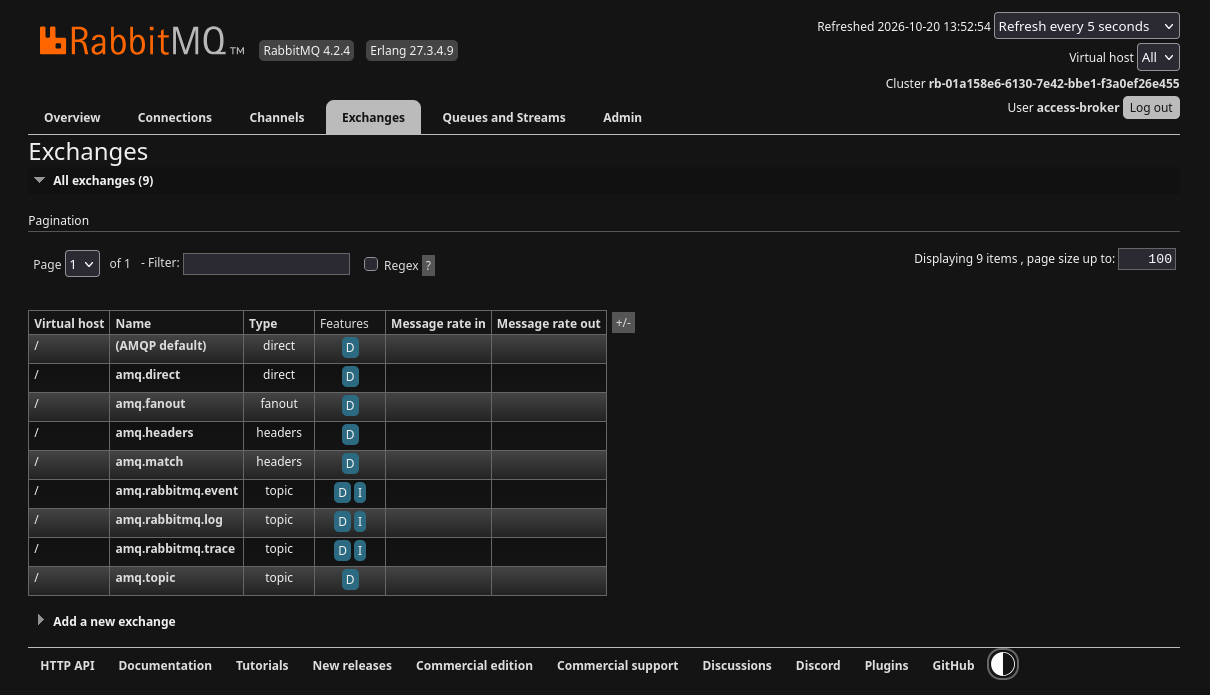
Exchanges route messages; the Queues and Streams tab is where you inspect the queues receiving them.
The article Connect an application and send a first message on CloudFerro Cloud demonstrates a producer and consumer in one short program. The article Manage RabbitMQ queues and access on CloudFerro Cloud covers queues, routing, and acknowledgements for an application with separate workers.
Connection and access
Term |
Meaning in the connection settings |
|---|---|
Virtual host (vhost) |
A separate namespace for queues, exchanges, and permissions within one broker. Applications must connect to the vhost that contains their resources. |
RabbitMQ user |
An account used to connect to RabbitMQ. Its vhost permissions control what it can configure, publish, and read. My Portal sign-in is separate. |
AMQPS |
An encrypted AMQP connection used by applications. It is different from the HTTPS address of the web console. |
CIDR |
A way to describe an allowed IP address range. For IPv4, an address followed by /32 admits that one address. |
Allowed IP Ranges |
The source networks permitted to reach the broker. Being on an allowed network does not replace RabbitMQ credentials or vhost permissions. |
What to do next
Use Prepare access and choose a broker on CloudFerro Cloud to prepare the values needed for the creation form.