
Choose compute capacity and scaling limits on CloudFerro Cloud
A notebook needs workers with enough CPU, memory, and storage to start. MLOps Studio also allocates a control plane to manage those workers. Choosing one size does not determine the other: agree on both before creating the environment.
Control plane sizes
The table lists the documented control plane configurations. Worker node capacity is configured separately. High Availability (HA) adds redundancy to the part of the environment that manages the cluster. It does not make extra copies of your notebooks or training jobs.
Control Plane Sizing Mode |
Size Flavor ID |
vCPU Allocation |
RAM Allocation |
System Storage Allocation |
|---|---|---|---|---|
Standard Mode (Non-HA) |
Small (sm) |
24 vCPU |
90 GB RAM |
100 GB Storage |
Standard Mode (Non-HA) |
Medium (md) |
48 vCPU |
180 GB RAM |
200 GB Storage |
Standard Mode (Non-HA) |
Large (lg) |
96 vCPU |
360 GB RAM |
400 GB Storage |
High Availability Mode (HA Enabled) |
Small HA (sm) |
48 vCPU |
180 GB RAM |
200 GB Storage |
High Availability Mode (HA Enabled) |
Medium HA (md) |
64 vCPU |
240 GB RAM |
400 GB Storage |
High Availability Mode (HA Enabled) |
Large HA (lg) |
128 vCPU |
480 GB RAM |
800 GB Storage |
Note
These allocations describe the documented form and example deployment. Check the values offered by your own instance creation form before allocating resources.
Worker node pools
Worker nodes run notebooks, training jobs, and model-serving workloads. The Node pools panel initially shows No node pools yet. Click Add node pool and select a flavor for each pool according to the required vCPU, RAM, disk space, and GPU hardware.
With autoscaling: true, set the minimum (min_size) and maximum (max_size) worker counts. The autoscaler adds or removes workers within these bounds according to workload resource requests.
The documented compute cost structure has two parts. The control plane and the minimum worker count form the baseline while the cluster is running. Additional workers created above min_size add variable compute use, up to max_size. After work completes and idle workloads are terminated, scaling back to the minimum reduces that variable use. A low workload does not remove the control plane or the configured minimum workers.
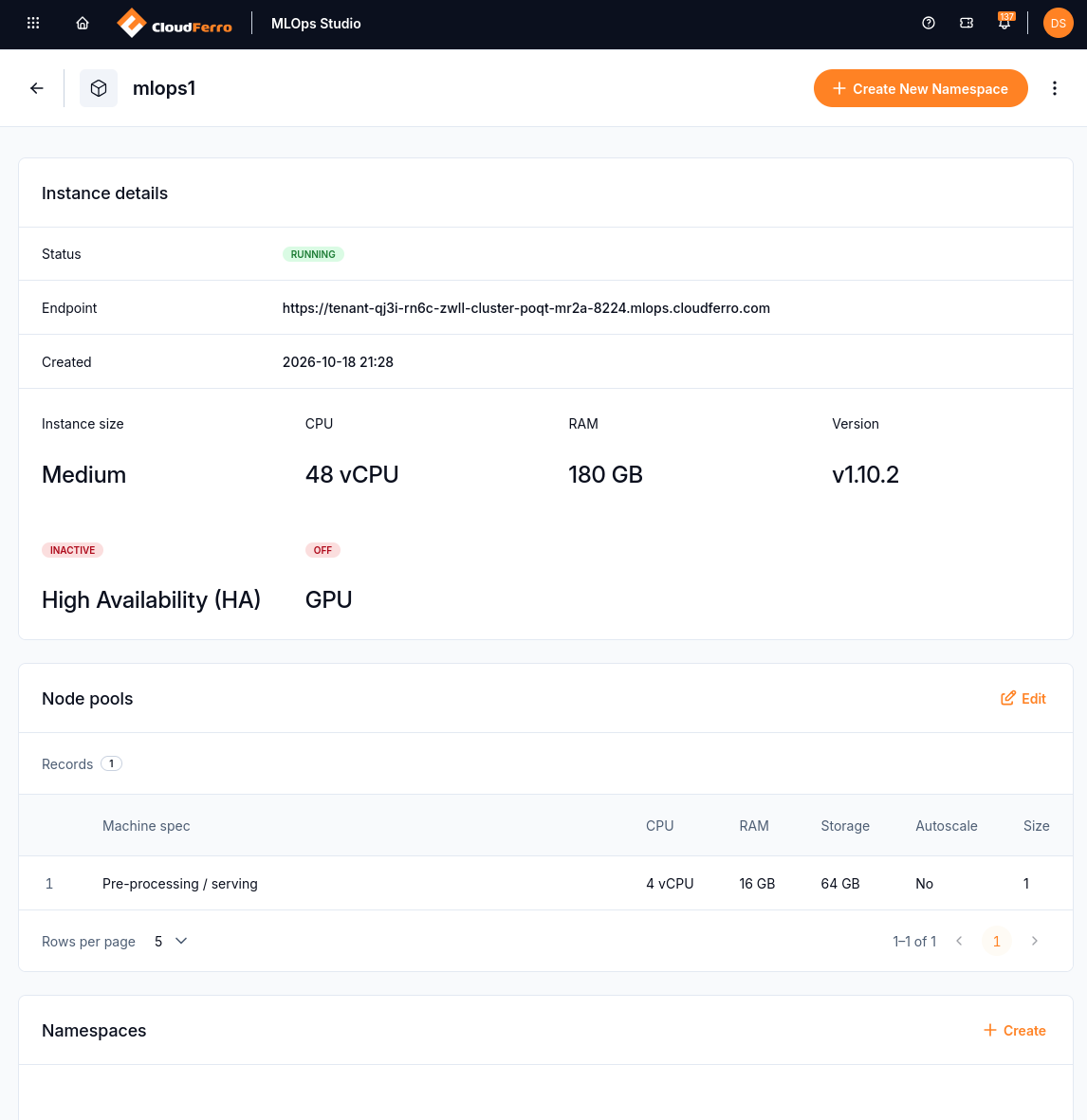
The worker pool is listed separately from the instance size. This saved example has one worker and autoscaling off.
Capacity, quotas, and notebook requests
A namespace quota limits what its users may request; it does not create worker capacity. A notebook’s CPU, memory, and GPU requests must fit the namespace limits and available workers. Not defined for a namespace limit means that no limit is set at that level, while the parent cluster remains bounded by its capacity and quotas.
What to do next
Apply these choices in Create an MLOps Studio instance on CloudFerro Cloud. Create namespaces and manage team access on CloudFerro Cloud covers workspace quotas, and Create and check a Kubeflow notebook on CloudFerro Cloud covers the resources requested by one notebook.