
Definitions of terms on CloudFerro Cloud
The portal and Kubeflow show several levels of your working environment. An instance, a namespace, and a notebook are different resources, even though you move through all three to run Python. These definitions explain the resources shown in the MLOps Studio overview.
From an instance to a Python cell
MLOps means machine learning operations: developing, running, and maintaining machine learning workflows and models. MLOps Studio is the product you open in My Portal. Kubeflow supplies the notebook and machine learning tools inside the environment.
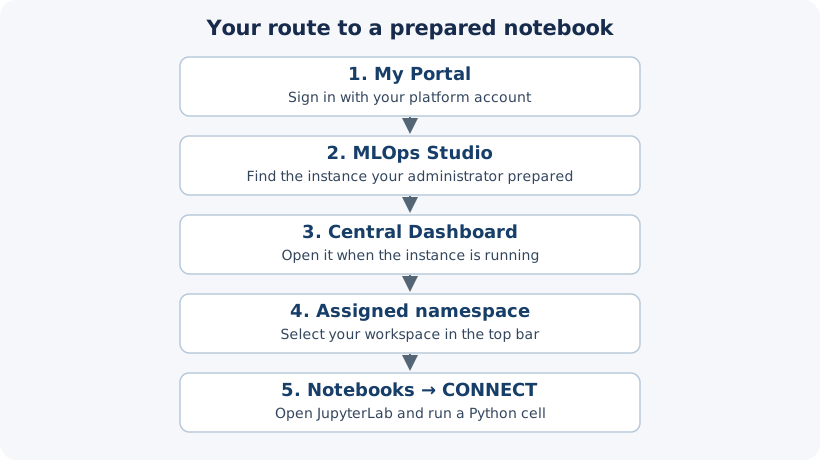
From My Portal, open the instance’s Central Dashboard, select a namespace, and connect to a notebook.
Term |
Meaning in the example |
|---|---|
Instance or cluster |
The cloud environment running Kubeflow and its workloads. The example instance is mlops1. |
Central Dashboard |
Kubeflow’s starting page, with shortcuts to notebooks, pipelines, models, and other tools. |
Namespace |
A workspace that groups resources and team access inside an instance. The example is mlops-namespace. |
Notebook environment |
The running environment listed under Notebooks, such as notebook1. It has a container image, compute resources, and storage. CONNECT opens its interface. |
JupyterLab |
A browser interface available for a notebook environment. It lets you create and edit notebook documents, browse files, and run Python through a kernel. |
Notebook document |
A file containing code cells, text, and results, usually saved with the .ipynb extension. You can create several documents inside one notebook environment. |
Kernel |
The process that executes a notebook document’s code. The first exercise uses a Python kernel. |
Creating a notebook environment and running a cell are separate steps. Create and check a Kubeflow notebook on CloudFerro Cloud shows both, including how to recognize an environment that is still starting.
Compute and storage
These names appear in the instance and notebook creation forms:
Term |
What it provides |
|---|---|
Control plane |
The part of the instance that manages the environment. Its resources are separate from the workers that run your code. |
Worker node and node pool |
A worker node is a machine that runs workloads. A node pool groups workers with a chosen configuration, such as their CPU, memory, and GPU hardware. |
CPU, RAM, and GPU |
Processing capacity, working memory, and optional graphics processors. A notebook requests these resources from the available workers. |
Container image |
The software template used to start the notebook environment. It supplies programs and packages, such as JupyterLab and Python. |
Object storage and bucket |
Storage for files accessed through an S3-compatible service. A bucket is a named container for those files. The instance creation form needs its connection details. |
Persistent volume claim (PVC) |
A request for storage that a workload can mount as a directory. A notebook uses a PVC for the workspace where you save documents and other files. |
Quota |
A limit on resources that an account, instance, or namespace may request. A quota does not add worker machines or storage capacity. |
The S3 bucket and the notebook’s mounted workspace serve different purposes. Files in the workspace can survive a notebook restart; packages installed only in the container’s system directories may not. Keep Python packages across notebook restarts on CloudFerro Cloud explains how to keep a Python environment on persistent storage.
Models and repeatable work
You will meet these terms when moving beyond the first Python check:
Term |
Meaning |
|---|---|
Model |
The result of training a machine learning system on data. An application uses it to produce predictions or other outputs. |
Pipeline |
A repeatable sequence of processing steps, such as preparing data, training a model, and checking the result. |
Artifact |
A file used or produced by the work, such as a prepared dataset, a report, or a saved model. |
Model Registry |
A catalog of models and their versions, with information identifying the saved model files. |
Model serving and endpoint |
Serving makes a trained model available to applications. Its endpoint is the address an application calls with input to obtain a result. |
The word endpoint also appears on the instance and storage screens. The instance endpoint opens its service; the S3 endpoint connects to object storage. Use the address requested by the particular tool or form.
What to do next
Prepare the bucket and connection details in Prepare object storage for MLOps Studio on CloudFerro Cloud. If your team has already prepared the environment, you can go directly to Open an existing Kubeflow notebook on CloudFerro Cloud.