
Troubleshoot notebooks and volume attachments on CloudFerro Cloud
A notebook can exist in the dashboard while its container is still unavailable. Check its readiness, events, and storage before changing resources. The same storage checks also apply to pipeline tasks that remain pending.
Prerequisites
No. 1 A running instance and the assigned namespace
Follow Open an existing Kubeflow notebook on CloudFerro Cloud to open Central Dashboard and select your team’s namespace. Have the namespace name and the affected resource name available.
No. 2 Kubernetes access for command-line checks
For the commands below, install kubectl and obtain the namespace’s kubeconfig as described in Create namespaces and manage team access on CloudFerro Cloud. Select the intended cluster context and confirm permission to inspect the named resources. Ask an administrator to run checks outside your role.
CONNECT is unavailable
Open the notebook’s OVERVIEW, EVENTS, and LOGS. PodInitializing means startup has not finished. Ready and ContainersReady must become successful before CONNECT is available; successful scheduling alone is insufficient. Record the namespace, notebook name, and the reason and message beside any failed condition.
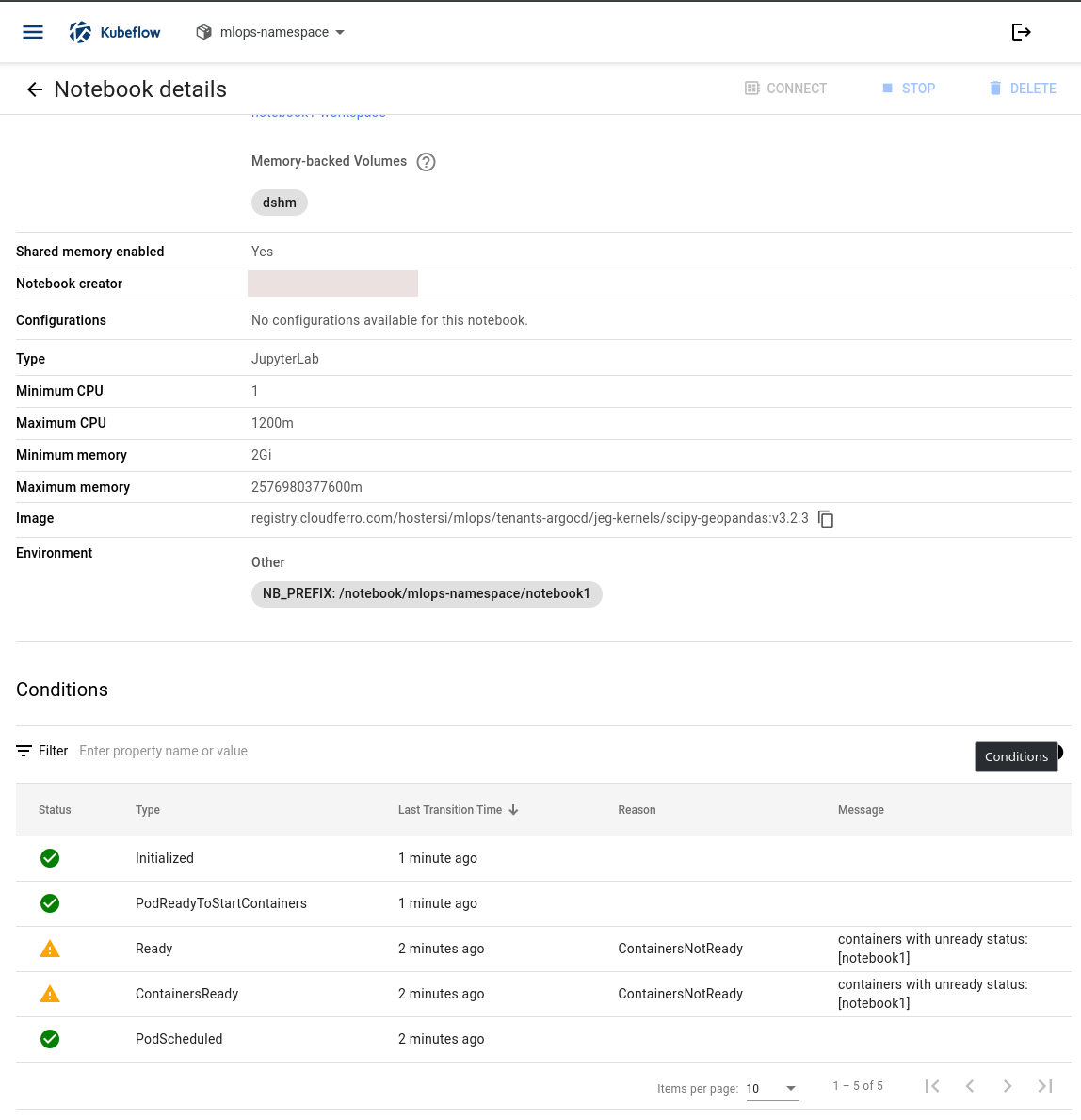
Read Reason and Message next to the warnings. Here the notebook has been scheduled, but its container is not ready.
Use the pod name reported by the notebook details or found in the namespace’s pod list for the checks below:
kubectl get pods --namespace <your-kubeflow-namespace>
kubectl describe pod <notebook-pod-name> --namespace <your-kubeflow-namespace>
Read Events for the actual cause. Missing images, resource requests that cannot be scheduled, and unavailable volumes require different fixes. If you cannot inspect pods, send the dashboard details to the administrator.
Read dashboard activity messages
The Activity tab on the Central Dashboard also lists messages about resources. Check the resource name beside each message before relating it to your notebook. A successful image download or container start for another service does not show that your notebook is ready.
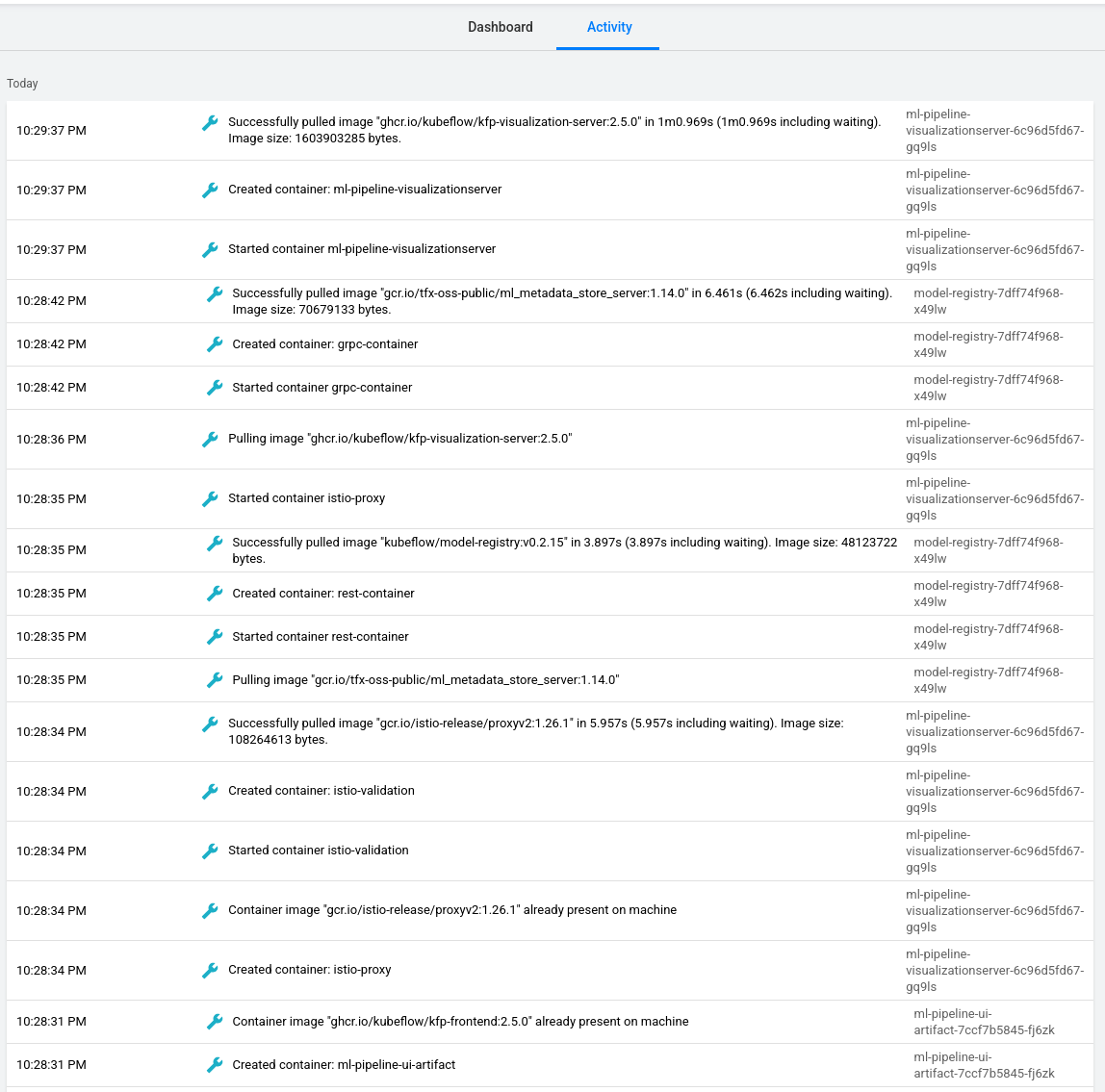
These example messages concern pipeline and model-registry services. Use your notebook’s own details to check its readiness.
A volume is attached to another node
When utilizing Persistent Volume Claims (PVCs) configured with the ReadWriteOnce (RWO) access mode, a notebook or pipeline may remain pending because the volume is attached to another node. This limitation manifests in two primary ways within the Kubeflow ecosystem:
A pipeline step remains pending: A pipeline step that attempts to mount a
ReadWriteOncePVC currently attached to another workload (such as an active notebook or another pipeline run) may remain pending if scheduled on another node. The Pipeline UI does not surface the reason for the hang.A new notebook does not start: The Kubeflow Notebooks UI allows users to successfully provision a new notebook using an RWO PVC that is already attached to an existing workload. The new notebook will fail to start, but the main UI does not proactively warn the user or block the creation.
The resource may have been created successfully even though its container cannot start. Pod events provide the reason for the attachment failure.
This issue is caused by a disconnect between Kubernetes storage primitives and the Kubeflow frontend layer:
Kubernetes RWO Constraints: By definition, a
ReadWriteOncevolume can only be mounted as read-write by a single node at a time. Multiple pods on the same node may share an RWO volume. A pod on another node cannot mount it read-write at the same time. The new pod may remain Pending, and the node reports aFailedAttachVolumeorMulti-Attachwarning event.Kubeflow UI Limitations: The main Kubeflow dashboards (both Pipelines and Notebooks) are optimized to track high-level pod execution states (e.g., Running, Succeeded, Failed). They do not natively extract, parse, and surface underlying Kubernetes scheduling events or volume attachment constraints on the primary views. Therefore, the UI simply waits for a pod to “start,” which never happens.
Workarounds and Best Practices
Coordinate access to a shared RWO volume; the access mode does not make its data ephemeral:
Notebooks: Save work and stop a notebook that is using the volume before a pipeline needs to attach that volume on another node. Coordinate this with other users of the workspace.
Pipelines: Use a separate PVC for each run when the workload does not need the same mounted volume. In KFP v2, kfp.kubernetes.CreatePVC provides PVC creation; VolumeOp belongs to the older SDK. Decide how to retain outputs before deleting a run’s PVC.
When a pipeline step or notebook is inexplicably hanging, inspect the storage attachment status directly via kubectl:
Identify the
Pendingpod in the user’s namespace.Inspect the pod’s recent events for multi-attach errors:
kubectl describe pod <pending-pod-name> -n <your-kubeflow-namespace>
Look at the Events: section at the bottom of the output. A volume conflict is confirmed if you see warnings similar to: Warning FailedAttachVolume Multi-Attach error for volume "pvc-xyz" Volume is already exclusively attached to one node and can't be attached to another.
Terminal work stops while the notebook is idle
The notebook controller uses Jupyter kernel activity and heartbeats. A process in a terminal, tmux, nohup, or the background can stop when the notebook is culled. Run notebook work through an existing Jupyter kernel. Use a Kubernetes Job, a pipeline, or a scheduled workload for work that must continue independently of the notebook.
What to do next
Create and check a Kubeflow notebook on CloudFerro Cloud illustrates notebook readiness conditions. For disappearing packages, use Keep Python packages across notebook restarts on CloudFerro Cloud; for local-editor connection details, use Connect a local editor to a Kubeflow notebook on CloudFerro Cloud. The upstream volume access modes explain RWO behavior.