
Definitions of terms on CloudFerro Cloud
The portal shows projects and repositories, while Docker commands refer to tags, digests, and a registry address. These names describe different parts of the same stored container image.
Using the project screens from the introduction and one example address, the definitions below connect what you see in My Portal with what you type in a terminal. You can return to the security and automation terms when a later task needs them.
From a container image to a running container
A container image packages an application with its libraries and runtime. A container is an instance created from that image to run the application. The registry stores and distributes container images; Docker or a platform such as Kubernetes runs the containers.
Push means upload a container image to the registry. Pull means download it to the computer or system that will use it.
Storage and security
Proxy cache projects. A proxy cache project is a pull-through cache of an upstream public registry. The first pull fetches the container image from the upstream and stores it in your project. Later pulls are served from the cache. This reduces latency and the number of requests sent to the upstream registry.
Quotas. Each project has a storage quota in GiB. A push that would exceed the quota is rejected. Quota usage is shown in the project overview.
Security features
vulnerability scanning, automatically on push or on demand, with a report that lists every vulnerability found in the container image, together with the package (library) it was found in
SBOM (Software Bill of Materials) generated on push
an allowlist for accepted vulnerabilities identified by CVE (Common Vulnerabilities and Exposures) IDs
a policy that prevents pulls of vulnerable container images
signature enforcement with Cosign or Notation
tag immutability and tag retention rules
a project audit log
Terms shown in the portal
Term |
Meaning for the user |
|---|---|
Region |
The data center where the registry runs. You select it in the region selector. Projects are not replicated between regions. |
Registry endpoint |
The host name used by container tools. For waw4-1 it is registries.waw4-1.cloudferro.com. |
Digest |
An identifier calculated from an artifact’s contents, for example sha256:3f1a9c…. Unlike a tag, it identifies specific content. |
Access token |
Credentials for one project, used by command-line tools and automated build and deployment jobs. The user name has the form robot$<project>+<name>. |
CRN |
CloudFerro Resource Name of a project: crn:raas:<region>:<brand-id>:<organization-id>:<resource-group-id>:project/<name>. |
Vulnerability report |
The scan result of an artifact: the list of CVEs and affected packages. |
SBOM |
The list of packages and licenses in an artifact, stored in SPDX 2.3 JSON format. |
CVE allowlist |
CVE IDs that the project accepts, with an optional expiration time. |
Tag immutability rule |
A rule that prevents matching tags from being overwritten and deleted. |
Tag retention rule |
A rule that decides which artifacts are kept when retention runs. Artifacts that no rule retains are deleted. |
Label |
A project-level marker that you can attach to artifacts. |
Container Registry interfaces
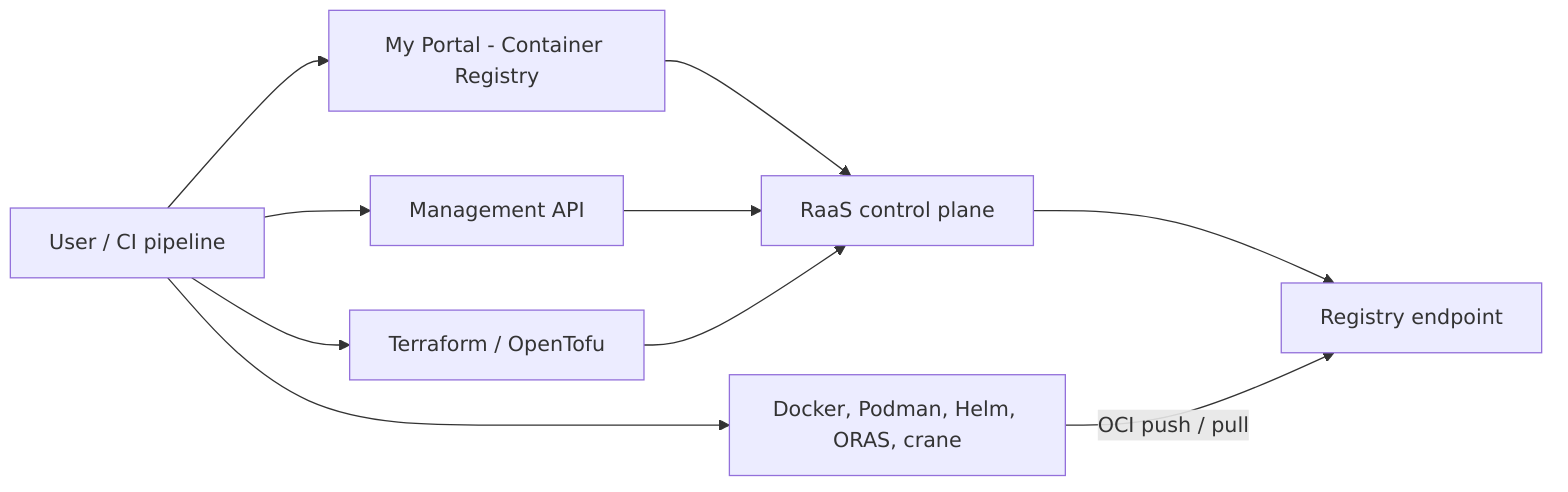
My Portal manages the project; container tools connect to the registry endpoint to push and pull artifacts.
For a first upload, My Portal and Docker are sufficient. The diagram also shows the API and Terraform paths used for automation.
The portal, the Management API, and the Terraform provider use the same API. That path covers projects, access tokens, policies, and reports. Container tools never go through the Management API. They talk to the registry endpoint over the OCI Distribution protocol and authenticate with an access token.
What to do next
Prepare a private project with Manage registry projects on CloudFerro Cloud.
If the project is already available, prepare client credentials with Access tokens and logging in on CloudFerro Cloud.
Return to the screen tour in Introduction to Container Registry on CloudFerro Cloud when you need to locate a control.